Live dashboard
A live, filterable code-health dashboard during `vite dev`. Enabled by default, no build step needed.
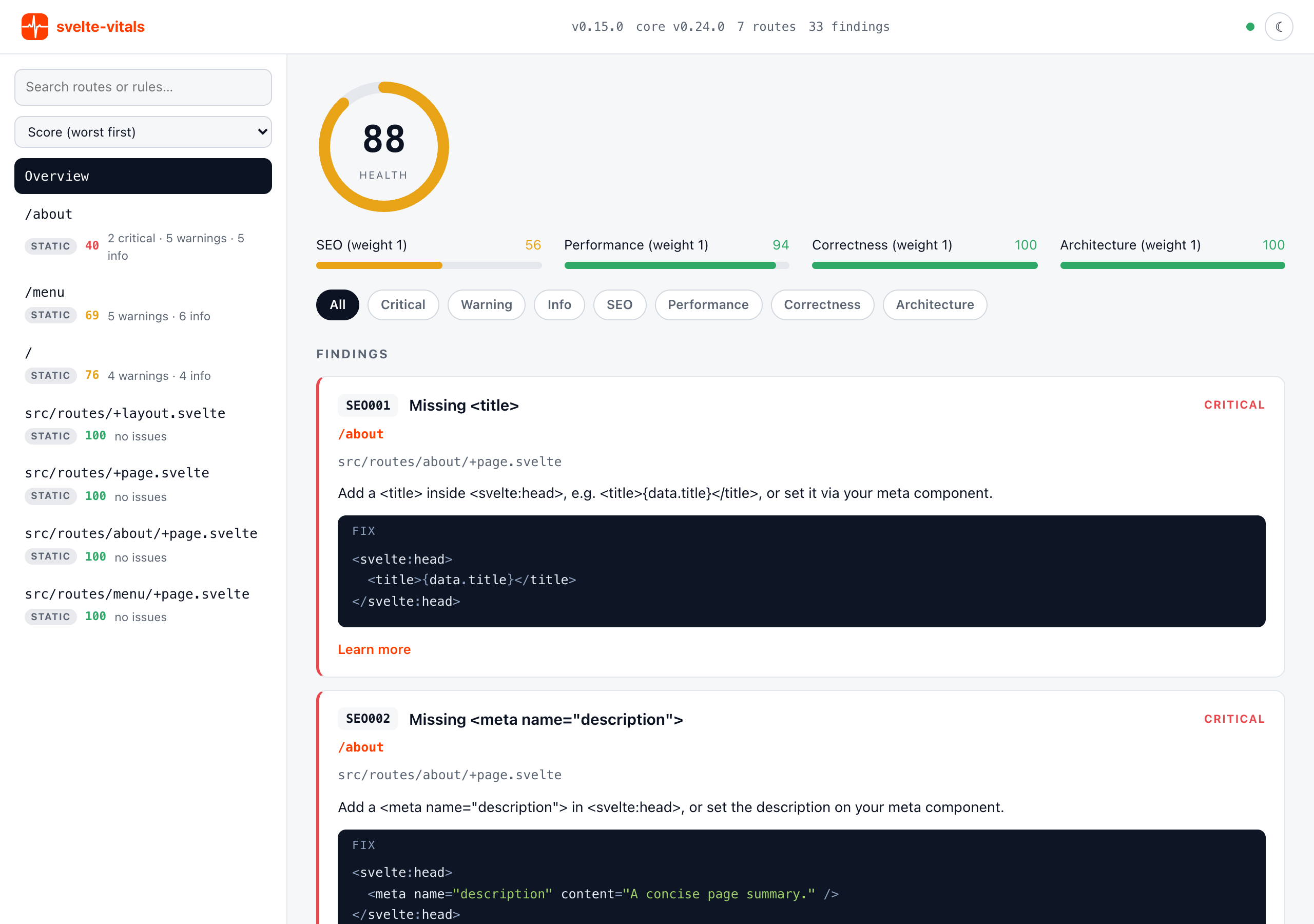
@svelte-vitals/vite’s svelteVitals() plugin serves a live dashboard at /__svelte-vitals/ during vite dev. It is a searchable, sortable route list with a detail pane for the selected route, plus an “Overview” that aggregates every finding across the whole project. It updates in place as you work, and it’s on by default; see Disabling it to opt out.
import { svelteVitals } from '@svelte-vitals/vite';

export default {
  plugins: [svelteVitals() /* , sveltekit() */]
};
vite dev prints the dashboard’s URL right after its own Local:/Network: lines every time the server starts, so you don’t have to remember the /__svelte-vitals/ path:
➜ svelte-vitals: http://localhost:5173/__svelte-vitals/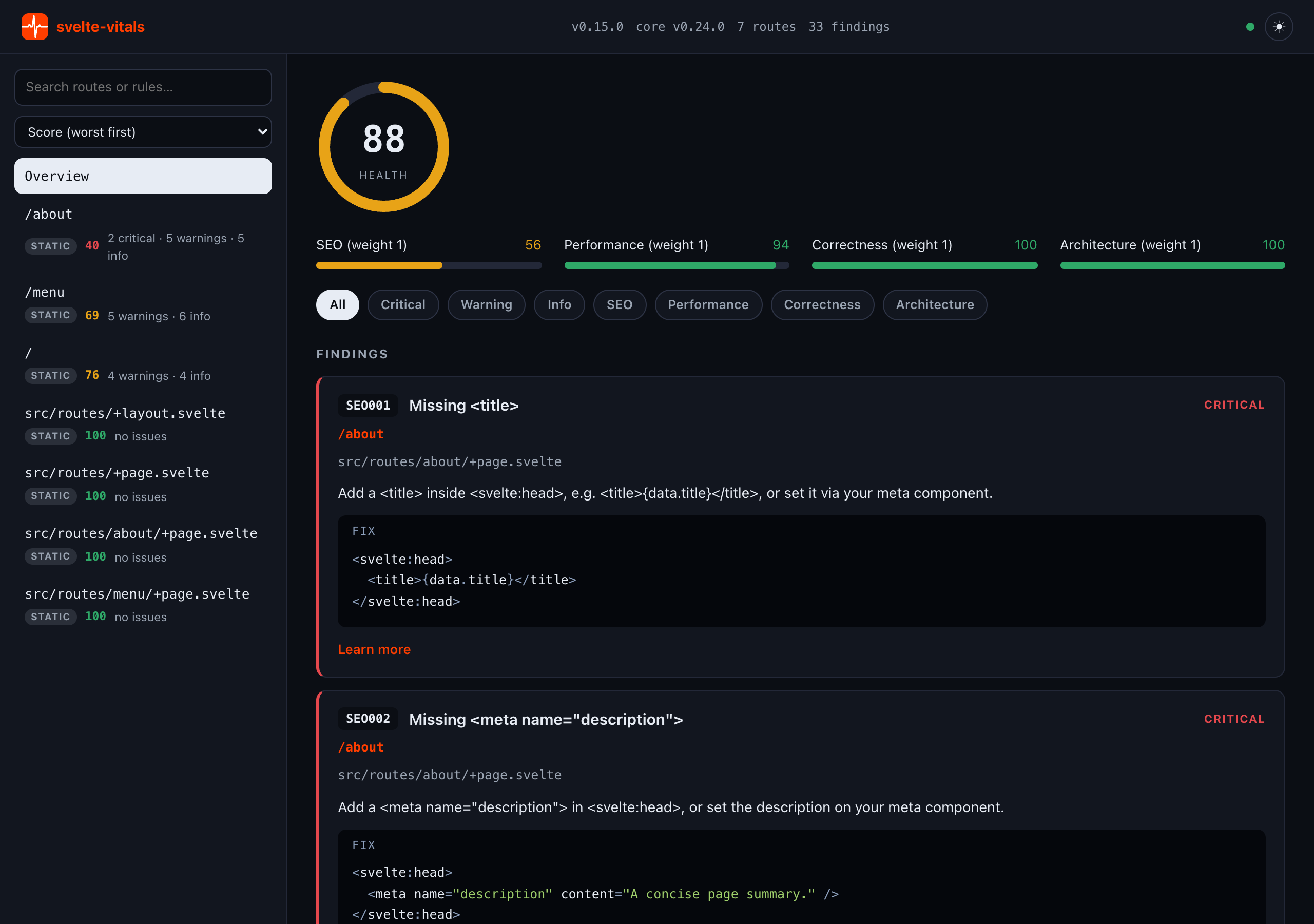
Whole-project coverage from startup
From the moment the dev server starts, the dashboard shows the whole project. A static analysis of all routes runs asynchronously at startup across every category (SEO, Performance, Correctness, Security, Architecture, Accessibility). It is the same analysis as npx svelte-vitals@latest, so you get the real project Health without visiting a single page. Saving a source file (anything under src/ or static/, or a svelte.config.* / svelte-vitals.config.*) triggers a debounced re-analysis, and the dashboard refreshes itself.
“Overview” lists every finding across the whole project in one place, every route plus the project’s site-wide checks, and the severity and category chips filter that list directly. Each finding shows which route it came from; clicking it jumps straight to that route’s detail pane.
The sidebar search filters routes by path or by a finding’s rule id, title or location; the sort control reorders it (worst score first by default). Selecting a route or “Overview” updates the detail pane and the URL hash, so a reload or shared link returns to the same view.
The topbar shows an “Analyzing…” indicator during a whole-project re-analysis, plus a dark-mode toggle remembered per browser (otherwise following your OS).
If the whole-project analysis fails, for example because the dev server root is not a SvelteKit project, svelte-vitals logs the failure with console.warn and the dashboard falls back to live-only mode, showing just the routes you visit. It never breaks the dev server.
Improve accuracy by browsing
On top of that static baseline, browsing your app refines the picture. Add the svelteVitalsHandle hook to src/hooks.server.ts:
import { svelteVitalsHandle } from '@svelte-vitals/vite/hooks';
import { sequence } from '@sveltejs/kit/hooks';

export const handle = sequence(svelteVitalsHandle());
If you already have other handles, place svelteVitalsHandle() alongside them inside sequence.
svelteVitalsHandle observes each request’s fully-rendered HTML via transformPageChunk, fire-and-forget: it never modifies or delays the response and swallows its own errors, so it cannot break the dev server.
On a visited route, a rendered result replaces the static one for the same rule id, which is closer to the truth, especially for dynamic values. The live layer runs the route-scoped SEO, Performance, and Accessibility rules that judge a route on its own. Rules that compare routes against each other (seo/duplicate-title, seo/duplicate-description) and site-wide rules (seo/robots-txt, seo/html-lang, a11y/doctype, …) keep their static result, since one page’s HTML cannot answer them. So does a11y/required-element, whose element list comes from the config file the handle does not read. The route’s other static findings, routeless (component- and site-scoped) findings, and unvisited routes stay as they were. Route headings carry a provenance badge: measured once a route has a rendered layer, static otherwise.
The handle is a no-op outside dev: the DEV flag from esm-env resolves statically at build time, so the rule set is never built and the hook adds zero runtime cost in production.
svelteVitalsHandle accepts an optional options object:
| Option | Type | Description |
|---|---|---|
metaComponents |
string[] |
Head-metadata components the analyzer cannot resolve |
rules |
Record<string, RuleSetting> |
Per-rule overrides, e.g. { 'seo/json-ld': 'off' } |
Example:
export const handle = sequence(
  svelteVitalsHandle({
    metaComponents: ['SeoHead'],
    rules: { 'seo/json-ld': 'off' }
  })
);
Notes:
- The handle analyzes the rendered HTML only:
<head>, body headings, images, landmarks, and ids, the same data the browser receives. Source-level dynamic values such as{data.title}are always resolved by the time the handle sees them, sotreatDynamicAsdoes not apply here. - The handle runs on its own options only; it does not read
svelte-vitals.config.*. A rule setting, option, oroverridesentry you keep in the config file shapes the static baseline but not the live layer; restate the rule settings you need in the options object above. failOnis not used: the handle feeds the dashboard but never gates the request.- Live updates only flow over a loopback origin (
localhost,127.0.0.1,[::1]). When you runvite dev --hostand open the app via a LAN IP, the handle skips the ingest POST, a guard against a spoofedHostheader, so visited routes won’t refine tomeasured. Open it fromlocalhostinstead. - Set
SVELTE_VITALS_DEBUG=trueto surface swallowed internal errors (analysis failures, skipped ingests) to the terminal for troubleshooting.
Copy a fix prompt for any finding
Every finding card has a collapsed AI Prompt disclosure. Expand it and hit Copy to get a ready-to-paste prompt for whichever coding agent you’re using, built from that finding’s rule id, location, recommendation, fix, and docs link:
Fix this svelte-vitals finding:

- Rule: seo/title-presence — Missing <title> (critical)
- Route: /blog/hello
- Location: src/routes/blog/hello/+page.svelte:3
- Recommendation: Add a <title> inside <svelte:head>.
- Fix: Add a <title> tag.

```svelte
<svelte:head>
  <title>Hello</title>
</svelte:head>
```

- Docs: https://oekazuma.github.io/svelte-vitals/rules/seo/title-presence

After fixing, re-run `svelte-vitals --diff` (or revisit this route) to confirm seo/title-presence passes for /blog/hello.
No AI call generates it. The dashboard assembles the prompt from svelte-vitals’ own rule data already in its snapshot, the same fields the agent reporter uses for its remediation document. It can’t hallucinate a fix that isn’t the rule’s actual recommendation.
Disabling it
The dashboard is on by default. If you only want the build-time gate and not the dev-time dashboard, for example on a very large project where you’d rather avoid the startup and re-analysis cost, pass ui: false:
export default {
  plugins: [svelteVitals({ ui: false })]
};
Version drift
The topbar shows the plugin version and, next to it, core v<@svelte-vitals/core version>. The second is the one that matters when comparing against the CLI: both packages are versioned independently around the shared core, so they can resolve to different core versions while each looks up to date. A rule added in a newer core then appears only in the package that depends on it.
Package-manager cooldown settings make this easy to hit unnoticed: pnpm’s minimumReleaseAge can resolve pnpm dlx svelte-vitals@latest down to an older “mature” release than your lockfile’s plugin depends on.
If the two disagree on findings, compare svelte-vitals --version’s (core X.Y.Z) against the topbar’s core vX.Y.Z before assuming a bug.